Software versions:
IOS XE 15.5
IOS XR 5.3
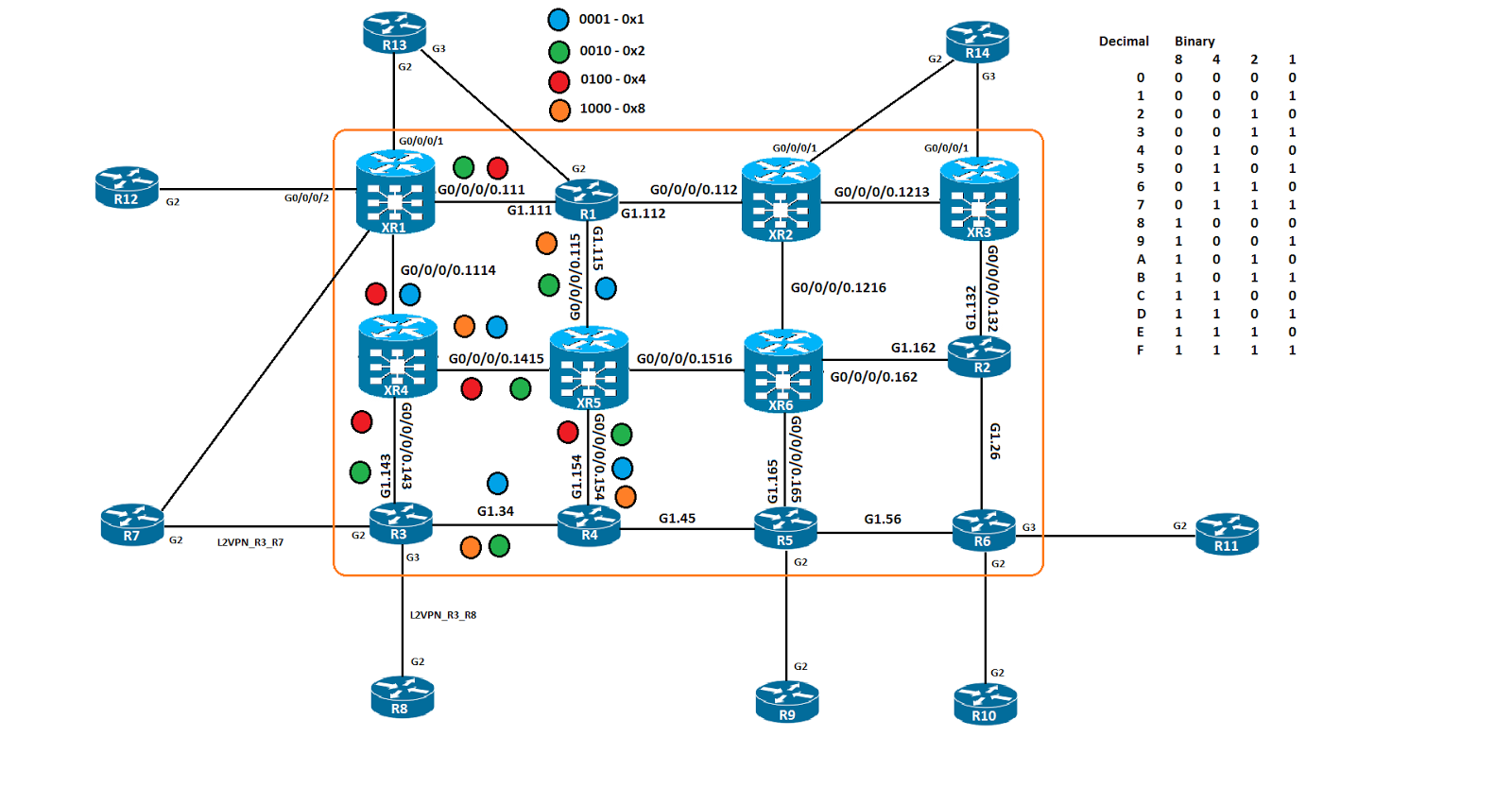
The topology for this demo:
In this post we will be expanding on the previous post, where we explored using affinity values to influence the path we took for TE paths. Well we are using some scalability options, the "list" in IOS and the "map" in XR.
The list in IOS acts very much like a "prefix-list" does, it matches some value we specify and then is used as a "true" or "false" mechanism on the TE tunnel for RSVP PCALC. The idea is to create the list with a given set of variables, the affinity, bandwidth and priority are a few of the options. Once the list is created it can be called by the "path option" feature under the TE interface. I have created 3 of them, the first is a single color match, BLUE in this case, the second is a 2 color match, GREEN and BLUE and the third is a 2 color, match RED but not ORANGE. These attribute lists are then called by the TE tunnels.
R3
mpls traffic-eng lsp attributes DUAL_COLOR
affinity 0x11 mask 0x11
mpls traffic-eng lsp attributes DUAL_COLOR_MATCH_ONLY_ONE
affinity 0x100 mask 0x1100
mpls traffic-eng lsp attributes SINGLE_COLOR
affinity 0x1 mask 0x1
!
interface Tunnel2
ip unnumbered Loopback0
tunnel mode mpls traffic-eng
tunnel destination 192.168.1.11
tunnel mpls traffic-eng path-option 2 dynamic attributes SINGLE_COLOR
!
interface Tunnel3
ip unnumbered Loopback0
tunnel mode mpls traffic-eng
tunnel destination 192.168.1.11
tunnel mpls traffic-eng path-option 3 dynamic attributes DUAL_COLOR
!
interface Tunnel4
ip unnumbered Loopback0
tunnel mode mpls traffic-eng
tunnel destination 192.168.1.11
tunnel mpls traffic-eng path-option 4 dynamic attributes DUAL_COLOR_MATCH_ONLY_ONE
R3#sho mpls traffic-eng tunnels brief | b P2P
P2P TUNNELS/LSPs:
TUNNEL NAME DESTINATION UP IF DOWN IF STATE/PROT
R3_t1 192.168.1.1 - Gi1.143 up/up
R3_t2 192.168.1.11 - Gi1.34 up/up
R3_t3 192.168.1.11 - unknown up/down
R3_t4 192.168.1.11 - Gi1.143 up/up
As you can see, Tunnel 1, 2 and 4 are up, Tunnel 3, there was an issue and didn't come up. That is was an affinity match logic that wasn't correct or could have been no match in the network was found, either could be true.
The "map" option is unique to XR and has some of those same options, it is meant to be an easier way to work with affinity. Mapping a human readable string to an affinity value, then using that string to identify affinity at the interface level. I only have 2 interfaces so I only have 2 affinity maps.
mpls traffic-eng
interface GigabitEthernet0/0/0/0.111
attribute-names GREEN
!
interface GigabitEthernet0/0/0/0.1114
attribute-names BLUE
!
affinity-map BLUE bit-position 0
affinity-map GREEN 0x10
interface tunnel-te1
ipv4 unnumbered Loopback0
logging events all
destination 192.168.1.3
affinity 0x1 mask 0x1
path-option 10 dynamic
!
interface tunnel-te2
ipv4 unnumbered Loopback0
logging events all
destination 192.168.1.3
affinity include GREEN
path-option 2 dynamic
!
interface tunnel-te3
ipv4 unnumbered Loopback0
logging events all
destination 192.168.1.3
affinity include BLUE
path-option 10 dynamic
RP/0/0/CPU0:XR1#show mpls traffic-eng tunnels brief
Wed Jan 25 22:29:01.598 UTC
TUNNEL NAME DESTINATION STATUS STATE
tunnel-te1 192.168.1.3 up up
tunnel-te2 192.168.1.3 up up
tunnel-te3 192.168.1.3 up up
R3_t1 192.168.1.1 up up
R3_t2 192.168.1.11 up up
R3_t4 192.168.1.11 up up
Displayed 3 (of 3) heads, 1 (of 1) midpoints, 2 (of 2) tails
Displayed 3 up, 0 down, 0 recovering, 0 recovered heads
As you can see, all three tunnels are up and operational.
Now that we have everything up and running, it's time to verify the tunnels. We'll start on IOS and then check XR.
R3#$n detail filter session-type 7 tunnel-id 4 | in Label|GigabitEthernet1.
Next Hop: 10.14.3.14 on GigabitEthernet1.143
Label: 24006 (outgoing)
R3#$n detail filter session-type 7 tunnel-id 2 | in Label|GigabitEthernet1.
Label: 1 (outgoing)
Next Hop: 10.3.4.4 on GigabitEthernet1.34
Label: 19 (outgoing)
As you can see, the RSVP TE label applied has 2, 19 towards R4 and 24006 towards XR4.
R3#show mpls forwarding-table labels 31 detail | in Label
Local Outgoing Prefix Bytes Label Outgoing Next Hop
Label Label or Tunnel Id Switched interface
31 Pop Label 192.168.1.11/32 0 Tu2 point2point
MAC/Encaps=18/22, MRU=1500, Label Stack{19}, via Gi1.34
Pop Label 192.168.1.11/32 488 Tu4 point2point
MAC/Encaps=18/22, MRU=1500, Label Stack{24006}, via Gi1.143
You can see in the mpls forwarding table output, that we are pointing out both tunnels with 2 different label values.
R3#sh ip cef 192.168.1.11 detail
192.168.1.11/32, epoch 2, flags [attached], per-destination sharing
local label info: global/31
2 RR sources [non-eos indirection, heavily shared]
attached to Tunnel2
attached to Tunnel4
The CEF table also shows that.
R3#traceroute mpls traffic-eng tunnel 2
Type escape sequence to abort.
0 10.3.4.3 MRU 1500 [Labels: 19 Exp: 0]
L 1 10.3.4.4 MRU 1500 [Labels: 24003 Exp: 0] 10 ms
L 2 10.15.4.15 MRU 1500 [Labels: 24004 Exp: 0] 6 ms
L 3 10.14.15.14 MRU 1500 [Labels: implicit-null Exp: 0] 3 ms
! 4 10.11.14.11 10 ms
R3#traceroute mpls traffic-eng tunnel 4
Type escape sequence to abort.
0 10.14.3.3 MRU 1500 [Labels: 24006 Exp: 0]
L 1 10.14.3.14 MRU 1500 [Labels: implicit-null Exp: 0] 10 ms
! 2 10.11.14.11 9 ms
When you do an MPLS trace, for each tunnel, they take different paths, which is the desired result based on the affinity values leveraged for the tunnels
R8#traceroute vrf BGP 12.12.12.12 source 8.8.8.8 num
Type escape sequence to abort.
Tracing the route to 12.12.12.12
VRF info: (vrf in name/id, vrf out name/id)
1 83.0.0.3 4 msec 1 msec 2 msec
2 10.3.4.4 [MPLS: Labels 19/24025 Exp 0] 11 msec 10 msec 12 msec
3 10.15.4.15 [MPLS: Labels 24003/24025 Exp 0] 9 msec 16 msec 23 msec
4 10.14.15.14 [MPLS: Labels 24004/24025 Exp 0] 20 msec 19 msec 21 msec
5 10.11.14.11 [MPLS: Label 24025 Exp 0] 23 msec 19 msec 21 msec
6 112.0.0.12 21 msec * 15 msec
We do a trace route and see that TE tunnel 2 gets used.
XR
RP/0/0/CPU0:XR1#sh rsvp reservation session-type lsp-p2p detail destination 192.168.1.3 | in "Label|Gi0/0/0/0.|TunID"
Wed Jan 25 23:23:58.193 UTC
RESV: IPv4-LSP Session addr: 192.168.1.3. TunID: 1. LSPId: 5.
Input adjusted interface: Gi0/0/0/0.1114. Input physical interface: Gi0/0/0/0.1114.
Labels: Outgoing downstream: 24005.
RESV: IPv4-LSP Session addr: 192.168.1.3. TunID: 2. LSPId: 2.
Input adjusted interface: Gi0/0/0/0.111. Input physical interface: Gi0/0/0/0.111.
Labels: Outgoing downstream: 33.
RESV: IPv4-LSP Session addr: 192.168.1.3. TunID: 3. LSPId: 2.
Input adjusted interface: Gi0/0/0/0.1114. Input physical interface: Gi0/0/0/0.1114.
Labels: Outgoing downstream: 24009.
Here we can see that the RSVP RESV labels have been populated which indicates that the affinity values configured were able to be matched on.
RP/0/0/CPU0:XR1#show mpls traffic-eng forwarding detail p2p | in "Tunnel|Label$
Wed Jan 25 23:25:39.136 UTC
Backup Tunnel: No backup available
Tunnel ID: 1 LSP ID: 5 Destination: 192.168.1.3 Ctype: 7
Output: Gi0/0/0/0.1114 Next Hop: 10.11.14.14 Output Label: 24005
Input: - Prev Hop: None Local Label: 24002
Backup Tunnel: No backup available
Tunnel ID: 2 LSP ID: 2 Destination: 192.168.1.3 Ctype: 7
Output: Gi0/0/0/0.111 Next Hop: 10.1.11.1 Output Label: 33
Input: - Prev Hop: None Local Label: 24005
Backup Tunnel: No backup available
Tunnel ID: 3 LSP ID: 2 Destination: 192.168.1.3 Ctype: 7
Output: Gi0/0/0/0.1114 Next Hop: 10.11.14.14 Output Label: 24009
Input: - Prev Hop: None Local Label: 24006
Backup Tunnel: No backup available
The MPLS TE forwarding table hows that tunnel ID 2 uses label 33 and tunnel ID 3 uses 24009.
RP/0/0/CPU0:XR1#sh cef 192.168.1.3 detail | in label
Wed Jan 25 23:26:28.422 UTC
local label 24003 labels imposed {ImplNull}
local label 24003 labels imposed {ImplNull}
local label 24003 labels imposed {ImplNull}
RP/0/0/CPU0:XR1#sh route 192.168.1.3
Wed Jan 25 23:27:00.410 UTC
Routing entry for 192.168.1.3/32
Known via "static", distance 1, metric 0 (connected)
Installed Jan 25 22:10:47.853 for 01:16:12
Routing Descriptor Blocks
directly connected, via tunnel-te1
Route metric is 0
directly connected, via tunnel-te2
Route metric is 0
directly connected, via tunnel-te3
Route metric is 0
No advertising protos.
RP/0/0/CPU0:XR1#traceroute mpls traffic-eng tunnel-te 2
Type escape sequence to abort.
0 10.1.11.11 MRU 1500 [Labels: 33 Exp: 0]
L 1 10.1.11.1 MRU 1500 [Labels: 24004 Exp: 0] 10 ms
L 2 10.1.15.15 MRU 1500 [Labels: 17 Exp: 0] 10 ms
L 3 10.15.4.4 MRU 1500 [Labels: implicit-null Exp: 0] 10 ms
! 4 10.3.4.3 1 ms
We trace MPLS for TE 2, we see label 33 as the first label, that will be important later on when we do the CE to CE trace.
RP/0/0/CPU0:XR1#traceroute mpls traffic-eng tunnel-te 3
Type escape sequence to abort.
0 10.11.14.11 MRU 1500 [Labels: 24009 Exp: 0]
L 1 10.11.14.14 MRU 1500 [Labels: 24006 Exp: 0] 0 ms
L 2 10.14.15.15 MRU 1500 [Labels: 23 Exp: 0] 0 ms
L 3 10.15.4.4 MRU 1500 [Labels: implicit-null Exp: 0] 10 ms
! 4 10.3.4.3 10 ms
We do the same trace for TE3 and we see label 24009 as the first label, this could be construed as a backup path since it is not used in the path between XR1 and R3.
R12#traceroute vrf BGP 8.8.8.8 source 12.12.12.12 num
Type escape sequence to abort.
Tracing the route to 8.8.8.8
VRF info: (vrf in name/id, vrf out name/id)
1 112.0.0.11 3 msec 1 msec 1 msec
2 10.1.11.1 [MPLS: Labels 33/52 Exp 0] 10 msec 8 msec 7 msec
3 10.1.15.15 [MPLS: Labels 24004/52 Exp 0] 27 msec 31 msec 38 msec
4 10.15.4.4 [MPLS: Labels 17/52 Exp 0] 77 msec 17 msec 11 msec
5 83.0.0.3 [MPLS: Label 52 Exp 0] 11 msec 9 msec 13 msec
6 83.0.0.8 23 msec * 12 msec
We can see that label 33 is used for TE2 in this output and not TE3. I haven't found any documentation that indicates why it works this way, but if you were to disable TE 2, TE 3 would be used instead. I shutdown TE 2.
R12#traceroute vrf BGP 8.8.8.8 source 12.12.12.12 num
Type escape sequence to abort.
Tracing the route to 8.8.8.8
VRF info: (vrf in name/id, vrf out name/id)
1 112.0.0.11 4 msec 1 msec 1 msec
2 10.11.14.14 [MPLS: Labels 24009/52 Exp 0] 12 msec 8 msec 10 msec
3 10.14.15.15 [MPLS: Labels 24006/52 Exp 0] 29 msec 31 msec 31 msec
4 10.15.4.4 [MPLS: Labels 23/52 Exp 0] 33 msec 28 msec 31 msec
5 83.0.0.3 [MPLS: Label 52 Exp 0] 15 msec 16 msec 15 msec
6 83.0.0.8 21 msec * 14 msec
TE 3 is now used.
Bringing TE 2 backup, a new outlabel is allocated.
RP/0/0/CPU0:XR1#sh mpls traffic-eng forwarding
Wed Jan 25 23:47:52.084 UTC
P2P tunnels:
Tunnel ID Ingress IF Egress IF In lbl Out lbl Backup
-------------------------- -------------- -------------- ------- ------- -------
192.168.1.3 1_396 Gi0/0/0/0.1114 Gi0/0/0/0.111 24001 3 unknown
192.168.1.11 1_5 - Gi0/0/0/0.1114 24002 24005 unknown
192.168.1.11 2_3 - Gi0/0/0/0.111 24005 42 unknown
192.168.1.11 3_2 - Gi0/0/0/0.1114 24006 24009 unknown
Displayed 3 tunnel heads, 1 label P2P rewrites
Displayed 0 tunnel heads, 0 label P2MP rewrites
Before it was label 33, now it is label 42.
Thanks for stopping by!
Rob Riker, CCIE #50693