Showing posts with label Affinity. Show all posts

Wednesday, January 25, 2017

CCIE SPv4 - MPLS Traffic Engineering - TE Attributes - Affinity Lists and Maps

Software versions:
IOS XE 15.5
IOS XR 5.3

The topology for this demo:
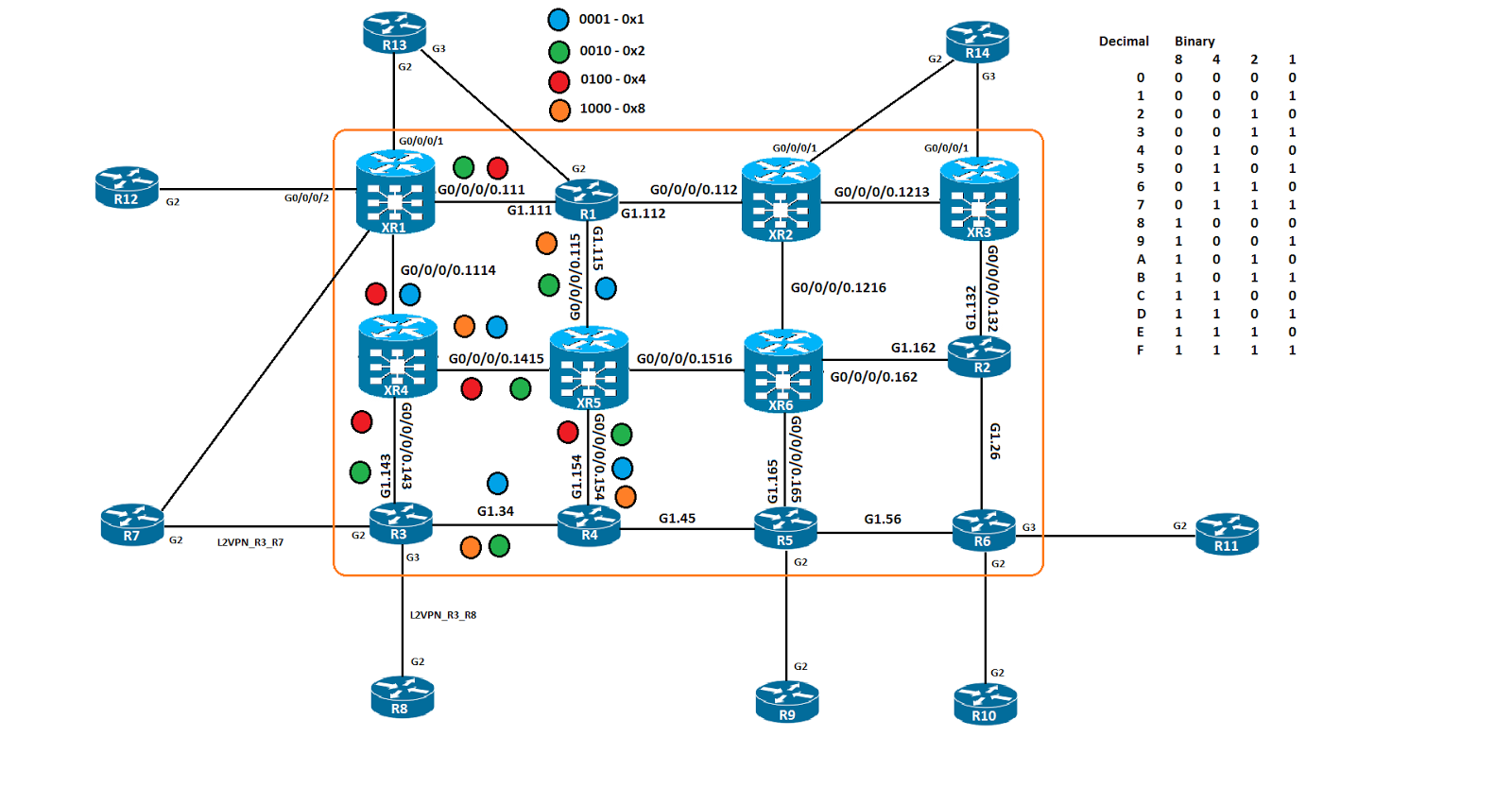
In this post we will be expanding on the previous post, where we explored using affinity values to influence the path we took for TE paths. Well we are using some scalability options, the "list" in IOS and the "map" in XR. 

The list in IOS acts very much like a "prefix-list" does, it matches some value we specify and then is used as a "true" or "false" mechanism on the TE tunnel for RSVP PCALC. The idea is to create the list with a given set of variables, the affinity, bandwidth and priority are a few of the options. Once the list is created it can be called by the "path option" feature under the TE interface. I have created 3 of them, the first is a single color match, BLUE in this case, the second is a 2 color match, GREEN and BLUE and the third is a 2 color, match RED but not ORANGE. These attribute lists are then called by the TE tunnels.

R3
mpls traffic-eng lsp attributes DUAL_COLOR
 affinity 0x11 mask 0x11
mpls traffic-eng lsp attributes DUAL_COLOR_MATCH_ONLY_ONE
 affinity 0x100 mask 0x1100
mpls traffic-eng lsp attributes SINGLE_COLOR
 affinity 0x1 mask 0x1
!
interface Tunnel2
 ip unnumbered Loopback0
 tunnel mode mpls traffic-eng
 tunnel destination 192.168.1.11
 tunnel mpls traffic-eng path-option 2 dynamic attributes SINGLE_COLOR
!
interface Tunnel3
 ip unnumbered Loopback0
 tunnel mode mpls traffic-eng
 tunnel destination 192.168.1.11
 tunnel mpls traffic-eng path-option 3 dynamic attributes DUAL_COLOR
!
interface Tunnel4
 ip unnumbered Loopback0
 tunnel mode mpls traffic-eng
 tunnel destination 192.168.1.11
 tunnel mpls traffic-eng path-option 4 dynamic attributes DUAL_COLOR_MATCH_ONLY_ONE


R3#sho mpls traffic-eng tunnels brief | b P2P
P2P TUNNELS/LSPs:
TUNNEL NAME                      DESTINATION      UP IF     DOWN IF   STATE/PROT
R3_t1                            192.168.1.1      -         Gi1.143   up/up
R3_t2                            192.168.1.11     -         Gi1.34    up/up
R3_t3                            192.168.1.11     -         unknown   up/down
R3_t4                            192.168.1.11     -         Gi1.143   up/up

As you can see, Tunnel 1, 2 and 4 are up, Tunnel 3, there was an issue and didn't come up. That is was an affinity match logic that wasn't correct or could have been no match in the network was found, either could be true. 

The "map" option is unique to XR and has some of those same options, it is meant to be an easier way to work with affinity. Mapping a human readable string to an affinity value, then using that string to identify affinity at the interface level. I only have 2 interfaces so I only have 2 affinity maps.

mpls traffic-eng
 interface GigabitEthernet0/0/0/0.111
  attribute-names GREEN
 !
 interface GigabitEthernet0/0/0/0.1114
  attribute-names BLUE
 !
 affinity-map BLUE bit-position 0
 affinity-map GREEN 0x10

interface tunnel-te1
 ipv4 unnumbered Loopback0
 logging events all
 destination 192.168.1.3
 affinity 0x1 mask 0x1
 path-option 10 dynamic
!
interface tunnel-te2
 ipv4 unnumbered Loopback0
 logging events all
 destination 192.168.1.3
 affinity include GREEN
 path-option 2 dynamic
!
interface tunnel-te3
 ipv4 unnumbered Loopback0
 logging events all
 destination 192.168.1.3
 affinity include BLUE
 path-option 10 dynamic

RP/0/0/CPU0:XR1#show mpls  traffic-eng tunnels brief
Wed Jan 25 22:29:01.598 UTC

                     TUNNEL NAME         DESTINATION      STATUS  STATE
                      tunnel-te1         192.168.1.3          up  up
                      tunnel-te2         192.168.1.3          up  up
                      tunnel-te3         192.168.1.3          up  up
                           R3_t1         192.168.1.1          up  up
                           R3_t2        192.168.1.11          up  up
                           R3_t4        192.168.1.11          up  up
Displayed 3 (of 3) heads, 1 (of 1) midpoints, 2 (of 2) tails
Displayed 3 up, 0 down, 0 recovering, 0 recovered heads

As you can see, all three tunnels are up and operational. 

Now that we have everything  up and running, it's time to verify the tunnels. We'll start on IOS and then check XR.

R3#$n detail filter session-type 7 tunnel-id 4 | in Label|GigabitEthernet1.
  Next Hop: 10.14.3.14 on GigabitEthernet1.143
  Label: 24006 (outgoing)
R3#$n detail filter session-type 7 tunnel-id 2 | in Label|GigabitEthernet1.
  Label: 1 (outgoing)
  Next Hop: 10.3.4.4 on GigabitEthernet1.34
  Label: 19 (outgoing)

As you can see, the RSVP TE label applied has 2, 19 towards R4 and 24006 towards XR4. 


R3#show mpls  forwarding-table labels 31 detail | in Label
Local      Outgoing   Prefix           Bytes Label   Outgoing   Next Hop
Label      Label      or Tunnel Id     Switched      interface
31         Pop Label  192.168.1.11/32  0             Tu2        point2point
        MAC/Encaps=18/22, MRU=1500, Label Stack{19}, via Gi1.34
           Pop Label  192.168.1.11/32  488           Tu4        point2point
        MAC/Encaps=18/22, MRU=1500, Label Stack{24006}, via Gi1.143

You can see in the mpls forwarding table output, that we are pointing out both tunnels with 2 different label values.

R3#sh ip cef 192.168.1.11 detail
192.168.1.11/32, epoch 2, flags [attached], per-destination sharing
  local label info: global/31
  2 RR sources [non-eos indirection, heavily shared]
  attached to Tunnel2
  attached to Tunnel4

The CEF table also shows that.

R3#traceroute mpls traffic-eng tunnel 2
Type escape sequence to abort.
  0 10.3.4.3 MRU 1500 [Labels: 19 Exp: 0]
L 1 10.3.4.4 MRU 1500 [Labels: 24003 Exp: 0] 10 ms
L 2 10.15.4.15 MRU 1500 [Labels: 24004 Exp: 0] 6 ms
L 3 10.14.15.14 MRU 1500 [Labels: implicit-null Exp: 0] 3 ms
! 4 10.11.14.11 10 ms


R3#traceroute mpls traffic-eng tunnel 4
Type escape sequence to abort.
  0 10.14.3.3 MRU 1500 [Labels: 24006 Exp: 0]
L 1 10.14.3.14 MRU 1500 [Labels: implicit-null Exp: 0] 10 ms
! 2 10.11.14.11 9 ms

When you do an MPLS trace, for each tunnel, they take different paths, which is the desired result based on the affinity values leveraged for the tunnels

R8#traceroute vrf BGP 12.12.12.12 source 8.8.8.8 num
Type escape sequence to abort.
Tracing the route to 12.12.12.12
VRF info: (vrf in name/id, vrf out name/id)
  1 83.0.0.3 4 msec 1 msec 2 msec
  2 10.3.4.4 [MPLS: Labels 19/24025 Exp 0] 11 msec 10 msec 12 msec
  3 10.15.4.15 [MPLS: Labels 24003/24025 Exp 0] 9 msec 16 msec 23 msec
  4 10.14.15.14 [MPLS: Labels 24004/24025 Exp 0] 20 msec 19 msec 21 msec
  5 10.11.14.11 [MPLS: Label 24025 Exp 0] 23 msec 19 msec 21 msec
  6 112.0.0.12 21 msec *  15 msec

We do a trace route and see that TE tunnel 2 gets used. 


XR
RP/0/0/CPU0:XR1#sh rsvp reservation session-type lsp-p2p detail destination 192.168.1.3 | in "Label|Gi0/0/0/0.|TunID"

Wed Jan 25 23:23:58.193 UTC
RESV: IPv4-LSP Session addr: 192.168.1.3. TunID: 1. LSPId: 5.
 Input adjusted interface: Gi0/0/0/0.1114. Input physical interface: Gi0/0/0/0.1114.
  Labels: Outgoing downstream: 24005.
RESV: IPv4-LSP Session addr: 192.168.1.3. TunID: 2. LSPId: 2.
 Input adjusted interface: Gi0/0/0/0.111. Input physical interface: Gi0/0/0/0.111.
  Labels: Outgoing downstream: 33.
RESV: IPv4-LSP Session addr: 192.168.1.3. TunID: 3. LSPId: 2.
 Input adjusted interface: Gi0/0/0/0.1114. Input physical interface: Gi0/0/0/0.1114.
  Labels: Outgoing downstream: 24009.

Here we can see that the RSVP RESV labels have been populated which indicates that the affinity values configured were able to be matched on.


RP/0/0/CPU0:XR1#show mpls traffic-eng forwarding detail p2p | in "Tunnel|Label$
Wed Jan 25 23:25:39.136 UTC
  Backup Tunnel: No backup available
Tunnel ID:    1 LSP ID:    5 Destination:     192.168.1.3 Ctype:  7
  Output: Gi0/0/0/0.1114    Next Hop: 10.11.14.14     Output Label: 24005
  Input:  -                 Prev Hop: None            Local Label:  24002
  Backup Tunnel: No backup available
Tunnel ID:    2 LSP ID:    2 Destination:     192.168.1.3 Ctype:  7
  Output: Gi0/0/0/0.111     Next Hop: 10.1.11.1       Output Label: 33
  Input:  -                 Prev Hop: None            Local Label:  24005
  Backup Tunnel: No backup available
Tunnel ID:    3 LSP ID:    2 Destination:     192.168.1.3 Ctype:  7
  Output: Gi0/0/0/0.1114    Next Hop: 10.11.14.14     Output Label: 24009
  Input:  -                 Prev Hop: None            Local Label:  24006
  Backup Tunnel: No backup available

The MPLS TE forwarding table hows that tunnel ID 2 uses label 33 and tunnel ID 3 uses 24009. 

RP/0/0/CPU0:XR1#sh cef 192.168.1.3 detail | in label
Wed Jan 25 23:26:28.422 UTC
     local label 24003      labels imposed {ImplNull}
     local label 24003      labels imposed {ImplNull}
     local label 24003      labels imposed {ImplNull}


RP/0/0/CPU0:XR1#sh route 192.168.1.3
Wed Jan 25 23:27:00.410 UTC

Routing entry for 192.168.1.3/32
  Known via "static", distance 1, metric 0 (connected)
  Installed Jan 25 22:10:47.853 for 01:16:12
  Routing Descriptor Blocks
    directly connected, via tunnel-te1
      Route metric is 0
    directly connected, via tunnel-te2
      Route metric is 0
    directly connected, via tunnel-te3
      Route metric is 0
  No advertising protos.


RP/0/0/CPU0:XR1#traceroute mpls traffic-eng tunnel-te 2
Type escape sequence to abort.

  0 10.1.11.11 MRU 1500 [Labels: 33 Exp: 0]
L 1 10.1.11.1 MRU 1500 [Labels: 24004 Exp: 0] 10 ms
L 2 10.1.15.15 MRU 1500 [Labels: 17 Exp: 0] 10 ms
L 3 10.15.4.4 MRU 1500 [Labels: implicit-null Exp: 0] 10 ms
! 4 10.3.4.3 1 ms

We trace MPLS for TE 2, we see label 33 as the first label, that will be important later on when we do the CE to CE trace. 

RP/0/0/CPU0:XR1#traceroute mpls traffic-eng tunnel-te 3
Type escape sequence to abort.

  0 10.11.14.11 MRU 1500 [Labels: 24009 Exp: 0]
L 1 10.11.14.14 MRU 1500 [Labels: 24006 Exp: 0] 0 ms
L 2 10.14.15.15 MRU 1500 [Labels: 23 Exp: 0] 0 ms
L 3 10.15.4.4 MRU 1500 [Labels: implicit-null Exp: 0] 10 ms
! 4 10.3.4.3 10 ms

We do the same trace for TE3 and we see label 24009 as the first label, this could be construed as a backup path since it is not used in the path between XR1 and R3.

R12#traceroute vrf BGP 8.8.8.8 source 12.12.12.12 num
Type escape sequence to abort.
Tracing the route to 8.8.8.8
VRF info: (vrf in name/id, vrf out name/id)
  1 112.0.0.11 3 msec 1 msec 1 msec
  2 10.1.11.1 [MPLS: Labels 33/52 Exp 0] 10 msec 8 msec 7 msec
  3 10.1.15.15 [MPLS: Labels 24004/52 Exp 0] 27 msec 31 msec 38 msec
  4 10.15.4.4 [MPLS: Labels 17/52 Exp 0] 77 msec 17 msec 11 msec
  5 83.0.0.3 [MPLS: Label 52 Exp 0] 11 msec 9 msec 13 msec
  6 83.0.0.8 23 msec *  12 msec

We can see that label 33 is used for TE2 in this output and not TE3. I haven't found any documentation that indicates why it works this way, but if you were to disable TE 2, TE 3 would be used instead. I shutdown TE 2.

R12#traceroute vrf BGP 8.8.8.8 source 12.12.12.12 num
Type escape sequence to abort.
Tracing the route to 8.8.8.8
VRF info: (vrf in name/id, vrf out name/id)
  1 112.0.0.11 4 msec 1 msec 1 msec
  2 10.11.14.14 [MPLS: Labels 24009/52 Exp 0] 12 msec 8 msec 10 msec
  3 10.14.15.15 [MPLS: Labels 24006/52 Exp 0] 29 msec 31 msec 31 msec
  4 10.15.4.4 [MPLS: Labels 23/52 Exp 0] 33 msec 28 msec 31 msec
  5 83.0.0.3 [MPLS: Label 52 Exp 0] 15 msec 16 msec 15 msec
  6 83.0.0.8 21 msec *  14 msec

TE 3 is now used. 

Bringing TE 2 backup, a new outlabel is allocated.

RP/0/0/CPU0:XR1#sh mpls traffic-eng forwarding
Wed Jan 25 23:47:52.084 UTC
P2P tunnels:

Tunnel ID                  Ingress IF     Egress IF      In lbl  Out lbl Backup
-------------------------- -------------- -------------- ------- ------- -------
192.168.1.3 1_396          Gi0/0/0/0.1114  Gi0/0/0/0.111 24001   3       unknown
192.168.1.11 1_5                        - Gi0/0/0/0.1114 24002   24005   unknown
192.168.1.11 2_3                        -  Gi0/0/0/0.111 24005   42      unknown
192.168.1.11 3_2                        - Gi0/0/0/0.1114 24006   24009   unknown

Displayed 3 tunnel heads, 1 label P2P rewrites
Displayed 0 tunnel heads, 0 label P2MP rewrites

Before it was label 33, now it is label 42.

Thanks for stopping by!
Rob Riker, CCIE #50693

CCIE SPv4 - MPLS Traffic Engineering - TE Attributes - Affinity on IOS XR

Software versions:
IOS XE 15.5
IOS XR 5.3

The topology for this demo:
In this post we will look at TE with "affinity" from IOS XR. Very similar to IOS, but much easier. Going further, the goal is to do a technology post on IOS first, then XR in the next. XRs implementation of TE is very similar configuration wise to IOS, and as we progress, you'll see overall its simplified. 

XR1 will be our test bed to connect to R3 so that R12 and R8 will be our guinea pigs. I have also enabled MPLS OAM or Operations, Administration and Maintenance on R1, R3, R4, XR1, XR4 and XR5 globally. This will allows us to do mpls pings/traces and trace the LSP and not the IGP path. 

Referencing the topology diagram above, we will specify that any path with RED or 0x4 or 0100 is to be included in the TE path. IOS XR has significantly more output in debugs. I'll add in what I believe is useful.

MPLS OAM for IOS
mpls oam

MPLS OAM for IOS XR
mpls oam

When you create a TE tunnel in XR, you use the "tunnel-te" option to do so. We also need a way to forward traffic to the remote PE, we'll use a static route.

XR1
interface tunnel-te1
 ipv4 unnumbered Loopback0
 logging events all
 destination 192.168.1.3
 affinity include 0x0100
 path-option 10 dynamic

You can see that I included 0x0100 or 0x4 which tells RSVP PCALC to use only RED paths.

router static
 address-family ipv4 unicast
  192.168.1.3/32 tunnel-te1

RP/0/0/CPU0:XR1#sh route static
Wed Jan 25 13:15:09.165 UTC

S    192.168.1.3/32 is directly connected, 00:59:47, tunnel-te1


RP/0/0/CPU0:XR1#sh mpls traffic-eng tunnels 1
Wed Jan 25 13:05:06.036 UTC


Name: tunnel-te1  Destination: 192.168.1.3  Ifhandle:0x480
  Signalled-Name: XR1_t1
  Status:
    Admin:    up Oper:   up   Path:  valid   Signalling: connected

The tunnel was successfully signalled and the tunnel attributes we specified were able to be met.

Path info (OSPF 1 area 0):
  Node hop count: 2
  Hop0: 10.11.14.14
  Hop1: 10.14.3.14
  Hop2: 10.14.3.3
  Hop3: 192.168.1.3

This is the hop by hop path from XR1 to R3.

Path Info:
      Incoming Address: 10.11.14.11
      Incoming:
      Explicit Route:
        Strict, 10.11.14.11
        Strict, 10.1.11.11
        Strict, 10.1.11.1
        Strict, 192.168.1.1

      Outgoing:
        Explicit Route:
          Strict, 10.1.11.1
          Strict, 192.168.1.1

This shows both the incoming info for the explicit route but the outgoing as well.

After the signalling is done, we need to check the RSVP reservation database to see which labels were assigned.

RP/0/0/CPU0:XR1#sh rsvp reservation detail session-type lsp-p2p | in Labels
Wed Jan 25 13:08:32.852 UTC
  Labels: Local downstream: 24001, Outgoing downstream: 3.
  Labels: Outgoing downstream: 24004.

We will assign 24001 locally and 24004 towards the next hop.

RP/0/0/CPU0:XR1#show cef 192.168.1.3 detail | in "tunnel|label"
Wed Jan 25 13:12:58.794 UTC
   via tunnel-te1, 3 dependencies, weight 0, class 0 [flags 0x8]
     local label 24003      labels imposed {ImplNull}
    0     Y   tunnel-te1                point2point


RP/0/0/CPU0:XR1#sh mpls forwarding labels 24004
Wed Jan 25 13:19:42.146 UTC
Local  Outgoing    Prefix             Outgoing     Next Hop        Bytes
Label  Label       or ID              Interface                    Switched
------ ----------- ------------------ ------------ --------------- ------------
24004  19          192.168.1.4/32     Gi0/0/0/0.111 10.1.11.1       0
       24003       192.168.1.4/32     Gi0/0/0/0.1114 10.11.14.14     0

We can see that label 24004 is locally assigned and label 24003 is the outgoing label towards R3.

RP/0/0/CPU0:XR1#sh mpls forwarding labels 24003
Wed Jan 25 13:21:51.187 UTC
Local  Outgoing    Prefix             Outgoing     Next Hop        Bytes
Label  Label       or ID              Interface                    Switched
------ ----------- ------------------ ------------ --------------- ------------
24003  Pop         192.168.1.3/32     tt1          point2point     0

Label 24003 as the local label pushes us to the TE tunnel where are supposed to go. 

It says we are to use label 24003 to forward to R3's loopback. However in our MPLS traces we see 24004 in the output.


RP/0/0/CPU0:XR1#traceroute mpls traffic-eng tunnel-te 1 lsp active

Type escape sequence to abort.

  0 10.11.14.11 MRU 1500 [Labels: 24004 Exp: 0]
L 1 10.11.14.14 MRU 1500 [Labels: implicit-null Exp: 0] 10 ms
! 2 10.14.3.3 10 ms

R12 sees 24004 in the output as well.

R12#traceroute vrf BGP 8.8.8.8 source 12.12.12.12 num
Type escape sequence to abort.
Tracing the route to 8.8.8.8
VRF info: (vrf in name/id, vrf out name/id)
  1 112.0.0.11 3 msec 0 msec 1 msec
  2 10.11.14.14 [MPLS: Labels 24004/52 Exp 0] 8 msec 5 msec 7 msec
  3 83.0.0.3 [MPLS: Label 52 Exp 0] 15 msec 16 msec 15 msec
  4 83.0.0.8 21 msec *  8 msec


The traffic gets there and the correct labels show up. 

Now let's change the affinity values and choose the all BLUE path.

XR1
interface tunnel-te1
 affinity 0x1 mask 0x1

%ROUTING-MPLS_TE-5-LSP_EXPLICITROUTE : tunnel-te1 (signalled-name: XR1_t1, LSP Id: 4) explicit-route, 10.11.14.14, 10.14.15.14, 10.14.15.15, 10.15.4.15, 10.15.4.4, 10.3.4.4, 10.3.4.3, 192.168.1.3.Jan 25 13:27:04.146 : te_control[1044]: %ROUTING-MPLS_TE-5-LSP_RECORDROUTE : tunnel-te1 (signalled-name: XR1_t1, LSP Id: 4) record-route empty.

te_control[1044]: %ROUTING-MPLS_TE-5-LSP_REROUTE_PENDING_CLEAR : tunnel-te1 (signalled-name: XR1_t1, old LSP Id: 3, new LSP Id: 4) has been reoptimized.
Jan 25 13:27:24.265 : te_control[1044]: %ROUTING-MPLS_TE-5-LSP_REOPT : tunnel-te1 (signalled-name: XR1_t1, old LSP Id: 3, new LSP Id: 4)

RP/0/0/CPU0:XR1(config-if)#do sh mpls traffic-eng tunnels 1
Wed Jan 25 13:27:29.754 UTC


Name: tunnel-te1  Destination: 192.168.1.3  Ifhandle:0x480
  Signalled-Name: XR1_t1
  Status:
    Admin:    up Oper:   up   Path:  valid   Signalling: connected

Config Parameters:
    Bandwidth:        0 kbps (CT0) Priority:  7  7 Affinity: 0x1/0x1

RP/0/0/CPU0:XR1#sh rsvp reservation det session-type lsp-p2p | in Labels
Wed Jan 25 13:37:44.952 UTC
  Labels: Local downstream: 24001, Outgoing downstream: 3.
  Labels: Outgoing downstream: 24005.

We see that label 24005 has been allocated.

We can't rely on the IPv4 unicast MPLS table for verifying the MPLS labels, we need to reference the traffic-engineering table.

RP/0/0/CPU0:XR1#sho mpls traffic-eng forwarding detail tunnel-id 1 p2p
Wed Jan 25 13:41:01.309 UTC
P2P tunnels:

Tunnel ID:    1 LSP ID:  396 Destination:     192.168.1.1 Ctype:  7
  Source:     192.168.1.3 Ext Tun ID:     192.168.1.3
  Output: Gi0/0/0/0.111     Next Hop: 10.1.11.1       Output Label: 3
  Input:  Gi0/0/0/0.1114    Prev Hop: None            Local Label:  24001
  LSD queue: 10
  Backup Tunnel: No backup available

Tunnel ID:    1 LSP ID:    4 Destination:     192.168.1.3 Ctype:  7
  Source:    192.168.1.11 Ext Tun ID:    192.168.1.11
  Output: Gi0/0/0/0.1114    Next Hop: 10.11.14.14     Output Label: 24005
  Input:  -                 Prev Hop: None            Local Label:  24002
  LSD queue: 10
  Backup Tunnel: No backup available

Displayed 1 tunnel heads, 1 label P2P rewrites
Displayed 0 tunnel heads, 0 label P2MP rewrites

As you can see we allocate the local label 24002 and the outgong label 24005 for this tunnel. Let's do an MPLS traceroute.

RP/0/0/CPU0:XR1#traceroute mpls traffic-eng tunnel-te 1 lsp active

Type escape sequence to abort.

  0 10.11.14.11 MRU 1500 [Labels: 24005 Exp: 0]
L 1 10.11.14.14 MRU 1500 [Labels: 24000 Exp: 0] 0 ms
L 2 10.14.15.15 MRU 1500 [Labels: 20 Exp: 0] 0 ms
L 3 10.15.4.4 MRU 1500 [Labels: implicit-null Exp: 0] 0 ms
! 4 10.3.4.3 10 ms

So as you can see, very straightforward in terms of setup and verification. One more trace from R12 to R8 will verify that the end to end connection is still good.

R12#traceroute vrf BGP 8.8.8.8 source 12.12.12.12 num
Type escape sequence to abort.
Tracing the route to 8.8.8.8
VRF info: (vrf in name/id, vrf out name/id)
  1 112.0.0.11 3 msec 1 msec 1 msec
  2 10.11.14.14 [MPLS: Labels 24005/52 Exp 0] 11 msec 9 msec 11 msec
  3 10.14.15.15 [MPLS: Labels 24000/52 Exp 0] 22 msec 31 msec 31 msec
  4 10.15.4.4 [MPLS: Labels 20/52 Exp 0] 31 msec 30 msec 31 msec
  5 83.0.0.3 [MPLS: Label 52 Exp 0] 16 msec 14 msec 16 msec
  6 83.0.0.8 19 msec *  11 msec

Thanks for stopping by!
Rob Riker, CCIE #50693

Tuesday, January 24, 2017

CCIE SPv4 - MPLS Traffic Engineering - TE Attributes - Affinity and Attribute flags

Software versions:
IOS XE 15.5
IOS XR 5.3

The topology for this demo:
In this post we will look at the link "affinity" that can be used to selectively include or exclude link(s) from being in the transit path from the TE head end to the tail end. The idea of the link affinity or link color is to label an interface with a set of values that could be mapped to SLA or service level agreement. Blue could be bulk traffic, Green could be transactional data, Red could be low latency and Orange could be high bandwidth. The idea is to use the "affinity" or attribute flags at the interface level so RSVP would know if that link is or is not to be used for TE forwarding. 

For those familiar with the ACL or Access Control Lists, the idea with the "anding" values is to use bits in the "wildcard" mask to directly map to the prefix to determine the level of match. Where a "0" means "This matters" or "must match" and the "1" means "this doesn't matter" or "I don't care". TE uses the reverse in it's logic, "1" means to match and "0" means to disregard. So when the TE tunnel is configured, if no "affinity" values are configured at the tunnel level and "attribute flags" are configured at the interface level, the tunnel will fail to come up.

The Affinity colors on the individual links directly correlate to a specific attribute flag configured at the interface level, specifying an affinity match value is required in our topology to allow RSVP to signal an end to end path.


R1
interface GigabitEthernet1.111
 mpls traffic-eng attribute-flags 0x6
!
interface GigabitEthernet1.115
 mpls traffic-eng attribute-flags 0x1011

R3
interface GigabitEthernet1.34
 mpls traffic-eng attribute-flags 0x1011
!
interface GigabitEthernet1.143
 mpls traffic-eng attribute-flags 0x110

R4
interface GigabitEthernet1.34
 mpls traffic-eng attribute-flags 0x1011
!
interface GigabitEthernet1.154
 mpls traffic-eng attribute-flags 0x1111

XR1
mpls traffic-eng
 interface GigabitEthernet0/0/0/0.111
  attribute-flags 0x110
 !
 interface GigabitEthernet0/0/0/0.1114
  attribute-flags 0x101

XR4
mpls traffic-eng
 interface GigabitEthernet0/0/0/0.143
  attribute-flags 0x110
 !
 interface GigabitEthernet0/0/0/0.1114
  attribute-flags 0x101
 !
 interface GigabitEthernet0/0/0/0.1415
  attribute-flags 0x1111

XR5
mpls traffic-eng
 interface GigabitEthernet0/0/0/0.115
  attribute-flags 0x1011
 !
 interface GigabitEthernet0/0/0/0.154
  attribute-flags 0x1111
 !
 interface GigabitEthernet0/0/0/0.1415
  attribute-flags 0x1111


R3
interface Tunnel1
 ip unnumbered Loopback0
 tunnel mode mpls traffic-eng
 tunnel destination 192.168.1.1
 tunnel mpls traffic-eng path-option 1 dynamic

The result:
TE-PCALC: 192.168.1.3_364->192.168.1.1_1 {7}: Path Request Info
  Flags:  METRIC_TE
  IP explicit-path: None (dynamic)
  bw 0, min_bw 0, metric: 0
  setup_pri 7, hold_pri 7
  affinity_bits 0x0, affinity_mask 0xFFFF
TE-PCALC-PATH: 192.168.1.3_364->192.168.1.1_1 {7}: Area (ospf 1  area 0) Path Lookup begin
TE-PCALC-PATH: 192.168.1.3_364->192.168.1.1_1 {7}: Get path: Failed to find a path to destination
TE-PCALC-PATH: 192.168.1.3_364->192.168.1.1_1 {7}: Area (ospf 1  area 0) Path Lookup end: path not found
TE-PCALC-API: 192.168.1.3_364->192.168.1.1_1 {7}: P2P LSP Path Lookup result: failed

The problem is that no affinity values were set, and every path from R3 to R1 has some attribute flag value configured, so when the RSVP PATH message tries to begin, it immediately fails due to the lack of TE tunnel affinity configuration.

R3#sh mpls traffic-eng tunnels tunnel 1

Name: R3_t1                               (Tunnel1) Destination: 192.168.1.1
  Status:
    Admin: up         Oper: down   Path: not valid   Signalling: Down

The operational state, Path and Signaling are all down or not valid.

To fix this we need to configure R3s TE Tunnel 1 with an appropriate affinity value and mask combination that will allow an end to end match to be made, this can be a combination of yes to Green and no to Red along the same path. We'll take a look at how that works later. For now, a simple affinity value and mask config at the TE tunnel level will suffice. Once configured, we'll have to flap the tunnel interface to force an RSVP PATH message

interface Tunnel1
 tunnel mpls traffic-eng affinity 0x0001 mask 0x0001


TE-PCALC-API: 192.168.1.3_394->192.168.1.1_1 {7}: P2P LSP Path Lookup called
TE-PCALC: 192.168.1.3_394->192.168.1.1_1 {7}: Path Request Info
  Flags:  METRIC_TE
  IP explicit-path: None (dynamic)
  bw 0, min_bw 0, metric: 0
  setup_pri 7, hold_pri 7
  affinity_bits 0x1, affinity_mask 0x1
TE-PCALC-PATH: 192.168.1.3_394->192.168.1.1_1 {7}: Area (ospf 1  area 0) Path Lookup begin
TE-PCALC-PATH:Path from 192.168.1.3 -> 192.168.1.1:
  10.1.15.1->0.0.0.0 (admin_weight=3):
  10.1.15.15->0.0.0.0 (admin_weight=3):
  10.15.4.15->0.0.0.0 (admin_weight=2):
  10.15.4.4->0.0.0.0 (admin_weight=2):
  10.3.4.4->0.0.0.0 (admin_weight=1):
  10.3.4.3->0.0.0.0 (admin_weight=1):
  num_hops 7, accumulated_aw 3, min_bw 0
TE-PCALC-PATH: 192.168.1.3_394->192.168.1.1_1 {7}: Area (ospf 1  area 0) Path Lookup end: path found
TE-PCALC-API: 192.168.1.3_394->192.168.1.1_1 {7}: P2P LSP Path Lookup result: success
Calling ext path_addmodify arginfo: 0x7EFF4BF8B540, avg: 0, peak: N/A, burst: 0x3E8
   mtu: N/A, qos: N/A,hint: 0x1600018A, new: TRUE, sub_lsp: 0x7EFF4C446020
*Jan 24 22:53:14.446: %MPLS_TE-5-TUN: Tun1: installed LSP 1_394 (popt 1) for nil, got 1st feasible path opt
RSVP: session 192.168.1.1_1[192.168.1.3] (7): Received Resv message from 10.3.4.4 (on GigabitEthernet1.34)
RSVP: 192.168.1.3_394->192.168.1.1_1[Src] {7}: Successfully parsed Resv message from 10.3.4.4 (on GigabitEthernet1.34)
RSVP: 192.168.1.3_394->192.168.1.1_1[Src] {7}: reservation not found--new one
*Jan 24 22:53:14.564: %MPLS_TE-5-LSP: LSP 192.168.1.3 1_394: UP
RSVP-RESV: Admitting new reservation: 7EFF4BFFC110
RSVP-RESV: reservation (RSB 0x7EFF4BFFC110) was installed on GigabitEthernet1.34
*Jan 24 22:53:14.564: %MPLS_TE-5-TUN: Tun1: LSP path change 1_394 for nil, normal
*Jan 24 22:53:14.568: %LINEPROTO-5-UPDOWN: Line protocol on Interface Tunnel1, changed state to up

R3#sh mpls traffic-eng tunnels tunnel 1 | sec Affinity
    Bandwidth: 0        kbps (Global)  Priority: 7  7   Affinity: 0x1/0x1

RSVP
10.3.4.4 10.15.4.4 10.15.4.15 10.1.15.15
                      10.1.15.1 192.168.1.1

By setting an affinity value that is matchable at the interface level, the RSVP PATH messages make it all the way down to R1 and the RSVP RESV messages make it all the way back to R3.

R3#sh mpls traffic-eng tunnels tunnel 1

Name: R3_t1                               (Tunnel1) Destination: 192.168.1.1
  Status:
    Admin: up         Oper: up     Path: valid       Signalling: connected
    path option 1, type dynamic (Basis for Setup, path weight 3)

R3#sh ip rsvp reservation detail filter session-type 7 tunnel-id 1 | b Label
  Label: 23 (outgoing)

We can see that label 23 was assigned via RSVP-TE.

R3#sh ip cef 192.168.1.1 detail
192.168.1.1/32, epoch 2, flags [attached]
  local label info: global/32
  3 RR sources [non-eos indirection, heavily shared]
  attached to Tunnel1

Local label 32 was assigned and we can use the MPLS forwarding table to see the detailed output for that.

R3#sh mpls forwarding-table labels 32 detail
Local      Outgoing   Prefix           Bytes Label   Outgoing   Next Hop
Label      Label      or Tunnel Id     Switched      interface
32         Pop Label  192.168.1.1/32   0             Tu1        point2point
        MAC/Encaps=18/22, MRU=1500, Label Stack{23}, via Gi1.34
        000C2924DCA2000C29062644810000228847 00017000
        No output feature configured

Label 23 is the label stack to get us to our next hop of R4.

R3#traceroute 192.168.1.1 source lo0 num
Type escape sequence to abort.
Tracing the route to 192.168.1.1
VRF info: (vrf in name/id, vrf out name/id)
  1 10.3.4.4 [MPLS: Label 23 Exp 0] 5 msec 3 msec 3 msec
  2 10.15.4.15 [MPLS: Label 24000 Exp 0] 20 msec 7 msec 8 msec
  3 10.1.15.1 7 msec *  8 msec

And the traceroute proves that we are taking the appropriate path. Let's test the end to end reachability from R8 to R13.

R8#traceroute vrf BGP 13.13.13.13 source 8.8.8.8 num
Type escape sequence to abort.
Tracing the route to 13.13.13.13
VRF info: (vrf in name/id, vrf out name/id)
  1 83.0.0.3 3 msec 1 msec 1 msec
  2 10.3.4.4 [MPLS: Labels 23/28 Exp 0] 8 msec 7 msec 7 msec
  3 10.15.4.15 [MPLS: Labels 24000/28 Exp 0] 28 msec 31 msec 31 msec
  4 131.0.0.1 [MPLS: Label 28 Exp 0] 17 msec 15 msec 15 msec
  5 131.0.0.13 20 msec *  11 msec

As you can see, we take the TE path.


We can also tell TSVP-TE via affinity bits to not use a path that has a certain color. For instance we could tell RSVP to avoid paths where the color Orange is applied.

interface Tunnel1
 tunnel mpls traffic-eng affinity 0x0 mask 0x8

R3#sh mpls traffic-eng tunnels tunnel 1

Name: R3_t1                               (Tunnel1) Destination: 192.168.1.1
  Status:
    Admin: up         Oper: up     Path: valid       Signalling: connected
    path option 1, type dynamic (Basis for Setup, path weight 3)

R3#sh mpls traffic-eng tunnels tunnel 1 | b RSVP
  RSVP Signalling Info:
       Src 192.168.1.3, Dst 192.168.1.1, Tun_Id 1, Tun_Instance 396
    RSVP Path Info:
      My Address: 10.14.3.3
      Explicit Route: 10.14.3.14 10.11.14.14 10.11.14.11 10.1.11.11
                      10.1.11.1 192.168.1.1

You can see that the path changed to avoid any links where the color Orange was applied.

R3#sh ip cef 192.168.1.1 detail
192.168.1.1/32, epoch 2, flags [attached]
  local label info: global/32
  3 RR sources [non-eos indirection, heavily shared]
  attached to Tunnel1

R3#sh mpls forwarding-table labels 32 detail
Local      Outgoing   Prefix           Bytes Label   Outgoing   Next Hop
Label      Label      or Tunnel Id     Switched      interface
32         Pop Label  192.168.1.1/32   0             Tu1        point2point
        MAC/Encaps=18/22, MRU=1500, Label Stack{24001}, via Gi1.143
        000C29769933000C290626448100008F8847 05DC1000
        No output feature configured

You can see that a new label, 24001 has been issued with a next hop of XR4.

R3#traceroute 192.168.1.1 source lo0 num
Type escape sequence to abort.
Tracing the route to 192.168.1.1
VRF info: (vrf in name/id, vrf out name/id)
  1 10.14.3.14 [MPLS: Label 24001 Exp 0] 6 msec 5 msec 4 msec
  2 10.11.14.11 [MPLS: Label 24001 Exp 0] 6 msec 6 msec 6 msec
  3 10.1.11.1 8 msec *  10 msec

The test is to see what path we take in the network now that we are avoiding the Orange links.

R8#traceroute vrf BGP 13.13.13.13 source 8.8.8.8 num
Type escape sequence to abort.
Tracing the route to 13.13.13.13
VRF info: (vrf in name/id, vrf out name/id)
  1 83.0.0.3 3 msec 1 msec 1 msec
  2 10.14.3.14 [MPLS: Labels 24001/28 Exp 0] 7 msec 10 msec 7 msec
  3 10.11.14.11 [MPLS: Labels 24001/28 Exp 0] 27 msec 31 msec 65 msec
  4 131.0.0.1 [MPLS: Label 28 Exp 0] 11 msec 7 msec 7 msec
  5 131.0.0.13 7 msec *  9 msec

It is working as expected. 

There are several other matching variations we could test out. I will leave those for upcoming posts.

Thanks for stopping by!
Rob Riker, CCIE #50693